
uNLIMITED DIGITAL MARKETING SUPPORT AND TECHNOLOGY
Do you want access to the most powerful digital marketing solution available for your business? Unlock limitless growth potential with our comprehensive digital marketing solution and expert support
Fill out the form below to get started!
WHAT YOU'LL GET

Unlimited Support
Gain access to unlimited support coupled with expert guidance to navigate our marketing technology seamlessly. Never feel stranded again as our team stands ready to assist you at every turn.

Comprehensive CRM Integration
Easily centralize your contacts with our CRM integration, including automatic LinkedIn imports. Track interactions across all platforms for targeted engagement strategies.

Autonomous AI Agents
Deploy agents that go beyond chat to manage pipelines and trigger complex workflows. These digital workers execute multi-step tasks 24/7, ensuring no lead is missed while autonomously scaling your operations to meet every business goal.

Industry-Specific Snapshots & Prebuilt Tools
Our platform comes with pre-built, customizable snapshots by industry loaded with automations, templates, and tools so you have begin putting our system to work on day one.

Powerful Email Marketing Tools
Utilize our robust email marketing technology to craft engaging campaigns and automate follow-ups. Maximize audience engagement and conversion rates with powerful tools designed to deliver results.

Autonomous AI Engagement
Deploy 24/7 agents that handle complex conversations and lead nurturing. These systems autonomously sync with your CRM and execute follow-up workflows, turning inquiries into sales-ready opportunities without human intervention.

Limitless Marketing Reach with Funnels
Create unlimited marketing funnels and materials effortlessly with our intuitive interface and customizable templates. Scale your outreach efforts exponentially and capture leads with ease.
MARKETING TECHNOLOGY FEATURES
Social Media Scheduling: Schedule social media across all major channels and have unlimited recurring posts
CRM & Pipeline Management: Track leads, manage customer relationships, and monitor sales pipelines in one place.
Automated Follow-Ups: Create custom workflows for email, SMS, and call reminders to engage prospects effortlessly.
Smart Workflow Automation: Automate lead routing and pipeline updates using AI that triggers personalized follow-ups based on real-time prospect sentiment.
Custom Chatbots: Qualify leads and answer inquiries 24/7 with AI-powered chat solutions.
Multi-Channel Marketing: Run email campaigns, text messages (SMS), and social media ads from a single platform.
Landing Page Builder: Design high-converting pages with drag-and-drop tools and customizable templates.
Appointment Scheduling: Allow customers to book directly into your calendar with automated reminders.
Review Management: Generate, track, and respond to customer reviews to boost online reputation.
Payment Processing: Accept payments seamlessly through the platform.
Industry-Specific Marketing Tools
Our platform comes with pre-built, customizable snapshots ready to use.
Unlimited Integrations: Compatable with Make.com and Zapier for unlimited integrations and AI automations.
Call Tracking & Recording: Monitor call performance and record important conversations for training and analysis.
AI Booking Agents: Deploy autonomous agents to qualify leads and book meetings directly into your calendar via SMS and DM 24/7.
Analytics Dashboard: Access real-time reporting on campaign performance and business metrics, including advertising reporting via Meta and Google.
Membership & Course Hosting: Create and sell online courses or membership programs directly through the system.
Lead Nurturing Funnels: Build automated sequences to turn cold leads into loyal customers.
Unlimited Users: Add your entire team to collaborate without additional licensing fees.
Mobile App: Manage your business on the go with the iOS and Android mobile apps.
Dedicated Support: Get expert assistance to help you maximize platform features.
WHO IS THIS FOR?
This plan is ideal for any business owner or marketing team looking to elevate their marketing efforts to the next level.
Whether you're a startup seeking growth or an established enterprise aiming for expansion, our Unlimited Digital Marketing support and technology are tailored to meet your needs.
If you desire to upgrade your marketing strategies while having dedicated support every step of the way, this plan is perfect for you.


How to Set Up a Booking Calendar in Ajax Union MarTech
Your time is the one thing you can't make more of, which makes it strange how much of it gets lost to scheduling itself. The back-and-forth emails trading availability. The "does Tuesday work?" thread that runs eight messages deep. The double-booking you catch an hour too late. Every one of those is friction between a person who wants to meet with you and the meeting actually happening — and friction is where prospects quietly drift away.
A booking calendar removes the negotiation entirely. You publish a link, the other person sees only the times you're genuinely free, they pick one, and it's booked — synced to your calendar, confirmed, and off your plate. Ajax Union MarTech gives you a full scheduling engine built right into the platform, so the same place you manage contacts and conversations also runs your availability. Set it up once and it works like a 24/7 assistant who never sleeps, never double-books, and never forgets to send the confirmation.
This guide walks through building your booking calendar from scratch: creating the calendar, configuring the rules that protect your time, syncing it with your personal calendar and video tools, and getting the link in front of the people who need to book.
Start With a Personal Booking Calendar
The foundation for one-on-one scheduling is a Personal Booking calendar, and it's worth understanding why you need one even if you already live in Google Calendar all day. Your everyday calendar shows what you're doing; a booking calendar defines the rules for how others can claim your time — your hours, your meeting lengths, your buffers, your limits. It's the layer that turns "here's my schedule" into "here's how you book me," and the rest of your setup builds on top of it.
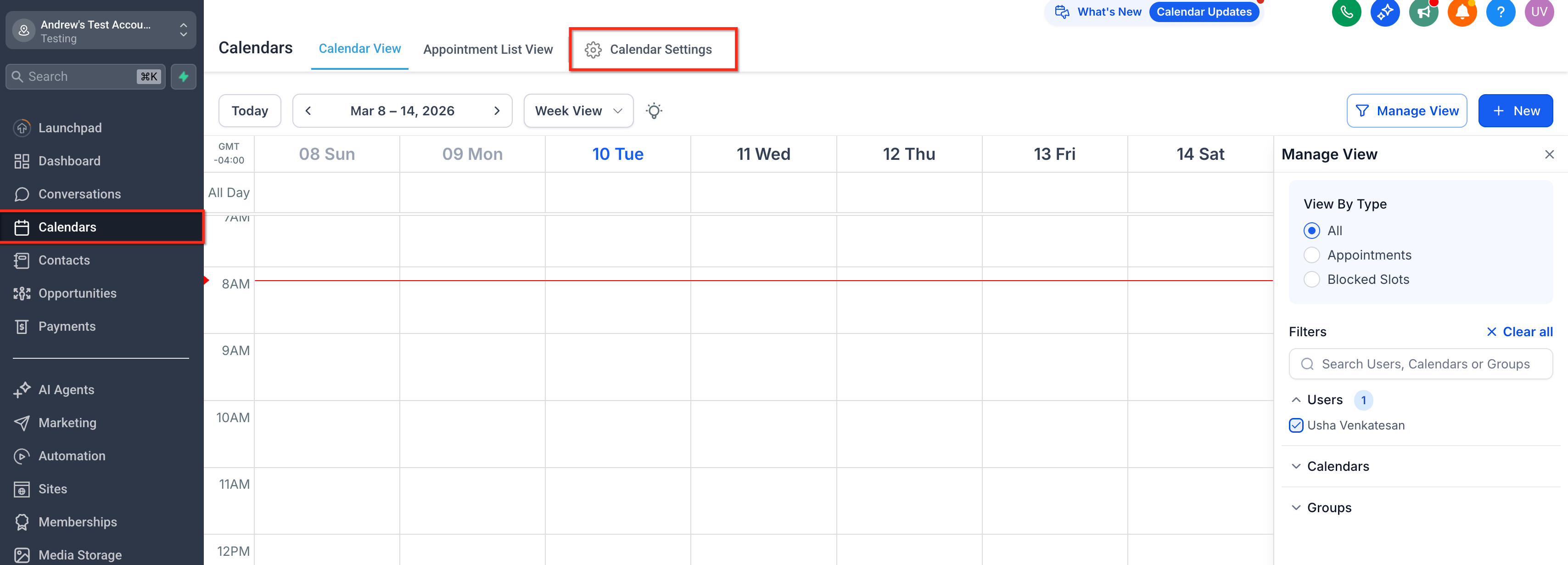
To create it, go to Calendars > Calendar Settings and click + New Calendar. You'll be asked to choose a calendar type — for standard one-on-one meetings, select Personal Booking. From there you fill in the essentials: give the calendar a friendly, recognizable name, set yourself as the host, review the custom URL it generates, choose your default appointment duration, and define the hours you're available. Click Confirm and you have a working calendar.
Configure the Rules That Protect Your Time
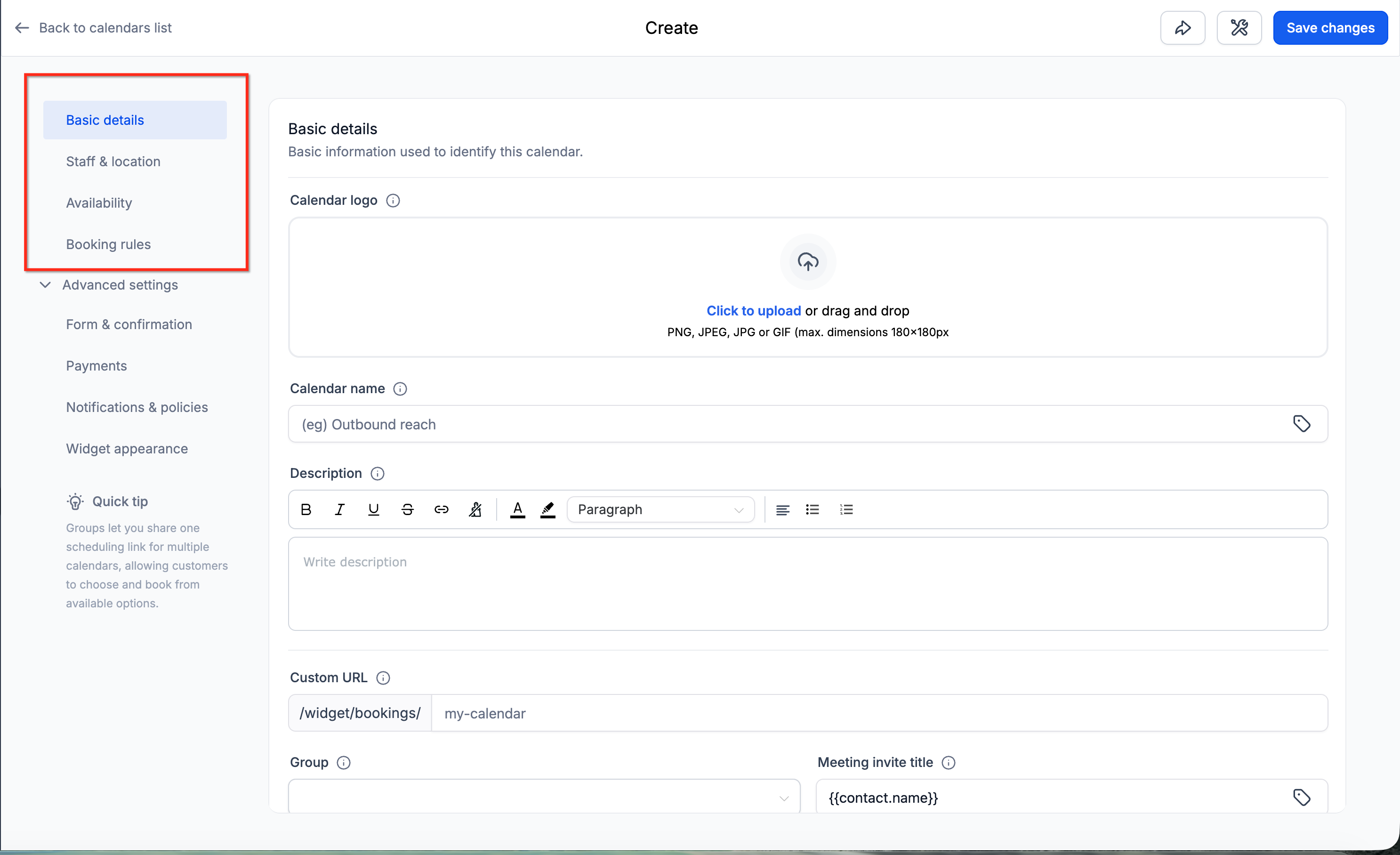
Calendar settings are organized into five sections so you can move through setup quickly: Basic details, Staff & location, Availability, Booking rules, and Advanced settings. Each one governs a different piece of how bookings behave, and the time you spend here is what separates a calendar that protects your day from one that lets anyone drop a meeting wherever they like.
Basic details holds the name, description, and the custom URL people will use. Staff & location is where you assign who hosts the meeting and where it happens — a physical address, a phone call, or a video link. Availability is the heart of it: the days and hours you accept bookings and how long each appointment runs. Booking rules is where you set the guardrails — buffer time between meetings so you're not sprinting from one call to the next, minimum notice so nobody books you ten minutes out, and limits on how many appointments land in a single day. Advanced settings covers the finer controls like form fields, confirmation behavior, and redirect options. Dial these in deliberately; the difference between a calendar that drains you and one that works for you usually lives in Booking rules.
Add Yourself as a Team Member
Even if you're a one-person operation, you need to exist in the system as a bookable user before you can be assigned as a host. Go to Settings > My Staff, click Add User, add yourself, and save. Think of it as giving yourself an account in your own scheduling system — it's what lets the calendar route appointments to you, and it's the same step you'd repeat for every team member you later add to a shared or round-robin calendar.
Sync With Your Personal Calendar and Video Tools
A booking calendar is only as trustworthy as the availability it shows, and the fastest way to lose that trust is a double-booking. Connecting your personal calendar fixes this with two-way sync: the platform reads your existing commitments so it never offers a slot you're already busy in, and it writes new bookings back so everything lives in one view.
Go to Calendars > Calendar Settings and open the Connections tab, then click Add New to link your personal calendar. While you're there, open the Video Conferencing tab and click Add New to connect your preferred meeting tool — Zoom, Google Meet, and the like. Once that's linked, every booking automatically generates and attaches the right meeting link, so neither you nor your client has to think about it. Take a minute afterward to confirm both integrations are syncing correctly; a calendar that's quietly out of sync is worse than no calendar at all.
Reminders and confirmation messages are a related but separate layer — if you want automated email, SMS, or WhatsApp reminders that cut no-shows, those are built as a reminder workflow, and our appointment reminder workflow guide walks through that setup end to end.
Get the Link in Front of People
A calendar nobody can find books nobody. Once yours is configured, sharing it takes seconds. Open Settings > Calendars > [Your Calendar] and click Share in the top-right header. From there you get four options, each suited to a different situation.
Copy grabs your standard booking link — the one you'll drop into email signatures, text messages, and social bios. The One-Time Link generates a single-use link for a specific person, useful when you want to invite one prospect without exposing your general availability. Embed Code gives you an HTML snippet to drop the calendar directly onto your website or landing page, so visitors book without ever leaving your site. And Preview lets you see the calendar exactly as a visitor would — always worth a look before you publish, so you catch anything off before a real prospect does.
When Something Looks Off
If time slots aren't appearing the way you expect, the platform includes a Troubleshoot Calendar diagnostic that checks your configuration and availability and points you toward the fix. Missing slots almost always trace back to one of three things: your available hours, a booking rule that's stricter than you realized, or a synced calendar marking you busy. The troubleshooter saves you from guessing.
Frequently Asked Questions
Do I need a booking calendar if I already use Google Calendar? Yes. Google Calendar tracks your schedule, but it doesn't define booking rules. The Personal Booking calendar is the layer that controls availability, durations, buffers, and limits — then you sync it with Google so the two stay aligned.
How do I stop people from booking back-to-back with no breathing room? Set buffer time inside Booking rules. It automatically holds open a gap before or after each appointment so you're never scheduled wall-to-wall.
Can someone book a time when I'm already busy? Not once you've connected your personal calendar. Two-way sync reads your existing events and removes those times from your available slots, which is the main defense against double-booking.
How do I send someone a link without exposing my whole calendar? Use the One-Time Link from the Share menu. It creates a single-use booking link for one person rather than publishing your general availability.
Can I put the calendar directly on my website? Yes. Choose Embed Code from the Share menu to get an HTML snippet you can paste into any page, so visitors book without leaving your site.
Where did my booking link go? Open Settings > Calendars > [Your Calendar], click Share in the top-right header, and select Copy Link. Your link stays the same unless you intentionally create a new one-time link.
A booking calendar is one of those setups that pays you back every single week. Spend the time now getting your availability, buffers, and sync dialed in, and you trade a recurring scheduling headache for a link that fills your week on its own — while you're doing literally anything else.

HOW MUCH IS IT?
Our monthly subscription is just $249*, providing you with unlimited access to all features and support without any hidden fees. Try it FREE for 7 days!
Enjoy the flexibility to cancel or upgrade your subscription at any time, ensuring you get the most value out of your investment in comprehensive digital marketing support and cutting-edge technology.
*Some features have usage-based fees - learn about them here.
WATCH NOW
Unlimited Digital Marketing
Marketing Automation Workshop Replay
Learn how our software can help you start nurturing your prospects and grow your business from the top of the funnel to the bottom line.
In this video you’ll learn:
Easy ways to organize your contacts and communicate better.
Simple methods for creating and handling social media posts.
Time-saving automation to make nurturing leads easier.
Ways to manage reviews and boost your company's reputation.
TAKE THE NEXT STEP TOWARDS DIGITAL MARKETING SUCCESS
Ready to revolutionize your marketing efforts?
Fill out the form below to access unlimited support, cutting-edge technology, and expert guidance.
Get started today for $249/mo or $2,490/yr with a FREE 7-day trial.
Additional Resources
Authority Blueprint
In this highly personalized process, we create an optimized LinkedIn marketing strategy for you, optimize your LinkedIn profile, and produce a calendar of content ideas for you to update your LinkedIn on a daily basis—complete with copy to get you started!
evyAI LinkedIn Assistant
Enhance your LinkedIn™ presence with evyAI,
a Chrome extension and a web app that supports your LinkedIn™ activities.
Create Personas, generate ideas, craft posts and 10x your LinkedIn™ exposure and productivity.
Monthly Strategy Session
Join our free monthly strategy session to get expert feedback on your current B2B marketing approach. Learn actionable ways to attract more leads and generate high-quality referrals.